Margin Math
White-Label SAT Margin Economics
Concrete tier math, sample 200-seat P&L, and the renewal mechanics that make HailBytes SAT a high-margin add-on for client compliance bundles.
Published Apr 2026
Read More →Phishing simulation, training, and audit-ready reports, plus continuous attack-surface monitoring across your client portfolio, all under your brand. Built for managed security providers attaching SAT and ASM to client compliance bundles.
A first-time evaluator assembles the full picture across a few pages. Here’s the order that answers the questions in sequence, from “why HailBytes” through pricing, a proof-of-concept, resale terms, and support SLAs:
Not ready to stand up a VM? See it before you deploy: the two product walkthroughs and the console screenshots further down show the white-label branding and PDF-report settings, real scan findings, and the client-facing deliverables (a generated ASM report, SAT campaign results, and the audit log with its exports), plus a note on the artifacts we have deliberately not put there.
Every MSSP client buying SOC 2 Type II, NIST CSF, HIPAA, PCI-DSS, or cyber-insurance compliance support (and ISO 27001 for international clients) is required to demonstrate periodic security awareness training and phishing simulation. The auditor demands it, the cyber-insurance carrier demands it, and increasingly the client’s board demands it. That means the SAT line item is one of the highest-attach, highest-renewal SKUs an MSSP can carry, provided the platform underneath it has the right cost structure.
Per-seat SaaS platforms like KnowBe4 and Proofpoint Security Awareness price for direct enterprise sales, not for white-label resale. By the time you mark up their per-seat license enough to cover your program-management cost, the client is netting numbers that do not justify the program.
HailBytes SAT prices per vCPU, not per seat. One marketplace instance handles unlimited users and hosts many client organizations, so the cost basis is the instance divided across your book. Adding seats to an existing client costs you nothing, and your gross margin on a 500-seat client looks nothing like it does on a per-seat reseller agreement.
The platform deploys to your AWS or Azure account (or the client’s, depending on your service model) in minutes via the marketplace listing, and tears down cleanly when a client churns. Two shapes, chosen against the client MSA:
A client that requires its own branding, its own identity provider, or self-service administration needs a dedicated instance. Review your client MSA requirements before choosing a shape; the topology comparison below has the detail. Reporting is CSV-exportable either way and feeds whatever client-facing template you already use.

4 minutes - explore HailBytes SAT →
For the team that delivers the service, not just the team that buys it. Out of the box, SAT ships:
Be deliberate in an RFP: this is a curated, fully-customizable library, not a multi-thousand-template catalog. The edge for an MSSP is editability, every lure and landing page is yours to rewrite per client, not raw template count. Browse the current set on the SAT product page.
White-label here means your brand replaces ours on the product and on every client-facing artifact. It does not mean a different brand per client. Be precise about the difference in an RFP:
Not supported on a shared instance: a different brand per client, a separate identity provider per client, or client self-service administration. Branding and SSO configuration are instance-wide, one identity-provider configuration per provider, per instance. A client that needs its own brand, its own IdP, or its own admins gets a dedicated instance. Do not promise a client-branded portal on a consolidated deployment.
Attack surface management is the other half of the managed-service book: continuous external recon that surfaces a client’s exposed subdomains, ports, services, and vulnerabilities between point-in-time pen tests. For MSSPs it carries the same economics as SAT: priced per vCPU, not per asset or per seat, so one instance covers a client’s entire attack surface no matter how many domains they run.
We would rather draw the line here than on your first PoC. Work is organized into
Projects, each with a hard ProjectQuota (targets, concurrent
scans, scans-per-day, monthly compute budget) and its own findings, exposure graphs,
recurring scheduled scans, scheduled reports, and per-Project SIEM destinations. Project
scoping is enforced at the middleware and API query layers, so an analyst account sees only
the Projects it belongs to.
Three things are still instance-wide, and they decide the shape:
/billing/ and /billing/projects/ screens are hidden from the sidebar for non-admin accounts but are not access-gated, so any account that can log in can read every Project’s name and spend.So: where your clients receive reports and never log in, one instance carries several client Projects, recurring scans included. The moment a client gets a login, put that client on its own instance, which is also the clean VM-and-database boundary most client MSAs ask for. We publish no clients-per-instance figure, because there is no measured basis for one. Projects stay useful inside a client either way, for business units, subsidiaries, acquisition targets, and separate scan scopes.
The resell economics mirror SAT: a flat per-instance software fee (plus your own cloud bill, which the marketplace meter does not cover) with your managed-service fee on top, and AWS CPPO / Azure MPO margin on the platform itself. Adding ASM to a compliance bundle alongside SAT turns a single client engagement into two high-attach, high-renewal SKUs on the same deployment substrate. Model both on the portfolio calculators below, and see the ASM Solution Brief for per-client architecture and operations detail.
You’re carrying uptime and response commitments to your own clients, so the vendor-side SLA you build on belongs in your business case, not a footnote. The same tier structure covers both SAT and ASM:
| Tier | Response SLA | Coverage |
|---|---|---|
| Community (free) | Best-effort (no SLA) | Docs, email & Discord |
| Professional | 72-hour | Business hours (Mon–Fri, 9am–5pm ET) |
| Enterprise | 24-hour + Critical-severity escalation | 24/7 including weekends |
Full tiers, pricing, and the escalation path are on the support pricing page. For organizations that need custom SLAs or multi-year terms, contact sales.
Most MSSPs evaluating HailBytes SAT need answers to two specific questions before they’ll commit to standing up the first client instance. We wrote articles on both:
If you’d rather scope white-label terms on a call than read about it, the HailBytes SAT product page has a 15-minute demo slot. We’ll walk through your client portfolio and build a tier-mix recommendation on the call.
The shape follows the client MSA. All four come out of the official Terraform modules at github.com/HailBytes/hailbytes-terraform-modules (MPL-2.0): consolidation is a matter of how many organizations you create on an instance, not a different module.
| Shape | Choose it when | Cost per month |
|---|---|---|
| Consolidated One instance, many client organizations sat-aws-singlesat-azure-single | You operate the platform, clients receive scheduled reports rather than logins, and no client MSA requires VM- or database-level separation. Isolation is row-level, with per-client sending identities and hostnames on a shared VM and database. | $1,400 software + ~$280 cloud at 8 vCPU $5,610 + ~$1,120 at 32 vCPU $1,100–$3,400 per client per year in software fees, the same range at every rung |
| Single instance per client The isolation shape sat-aws-singlesat-azure-single | The MSA requires physical separation, or the client needs its own branding, its own identity provider, or self-service administration. Those three are only deliverable on a dedicated instance. It is also the shape we deploy for ASM. | $1,400 software + ~$280 cloud per client,
about $1,680/mo all-in $16,800/year whether it serves one client or several |
| HA hot-hot per client 2 × 8 vCPU sat-aws-hasat-azure-ha | The client MSA carries a formal uptime SLA: regulated industries, healthcare, financial services. Adds an ALB / Standard LB, Multi-AZ RDS / Zone-Redundant Postgres Flex, and shared Redis, with pre/post-patch SSM verifiers in the module. | $2,800 software + ~$560 cloud per client, before the load-balancer and Multi-AZ database premium |
| Auto-scaling One shared tenant, many clients sat-aws-autoscalesat-azure-autoscale | Aggregate send volume outgrows a single node, common above 100 campaigns/month. Same row-level isolation as the consolidated shape, plus read replicas, rolling instance refresh with auto-rollback on 5xx, and an ElastiCache shared session store. | from $2,800 software + ~$560 cloud at the two-node baseline
(8-vCPU nodes, 16 metered vCores), before read replicas each further node adds $1,400 |
The meter rate is identical across all four ($0.24/vCPU-hour); what changes is how many vCPU you run and what sits underneath them. The marketplace meter is a software fee only: deployments are Bring-Your-Own-Cloud, so the VM, database, storage and networking land on your own AWS or Azure bill. Cross-cloud parity is intentional, and AWS HA and Azure HA land within ~6% of each other at procurement-grade sizing. Full topology comparison and customer-shape examples →
Software fees are the published marketplace list rate at $1.92/hour for 8 vCPU. Annual commitments take 30% (1-year, paid upfront), 35% (2-year), or 40% (3-year) off list via private offer. The cloud column is your own bill, estimated at ~$35/vCPU/month for the whole stack (VM, PostgreSQL, Redis, storage) and varying by region and reserved-instance pricing.
Sizing on this ladder is throughput, not a client-organization cap: we do not publish a maximum number of client organizations per instance, because we have not measured one. Size to your aggregate send volume and target count. This is the SAT ladder; the same “no published count” rule applies to ASM, where a client that logs in or needs its own brand takes its own instance, typically 8 vCPU.
A single MSSP book can hold a HIPAA-covered US client, a GDPR-subject EU client, and a NYDFS-regulated financial client at the same time, and each will ask “where is our data stored?” on the first procurement call. Because HailBytes is a Bring-Your-Own-Cloud marketplace image, you can answer all three cleanly:
sa-east-1 or brazilsouth.This mirrors the data-sovereignty model on the enterprise page (“Your Cloud Account. Your Data.”); GDPR DPA terms for client data you process are in the HailBytes DPA.
The marketplace path most MSSPs miss until late in evaluation is the channel-partner private-offer flow on both clouds. It is what lets you mark up the platform itself, capture the resale margin, and have the customer’s purchase still count toward their EDP or MACC commit, without the customer having to onboard HailBytes as a new vendor:
What that looks like in unit economics, on a 32 vCPU consolidated instance:
Margin scales with what the customer spends, so a book of dedicated per-client instances carries proportionally more of it, and costs the customer proportionally more. The customer sees one cloud invoice, their CFO sees committed-spend drawdown, and you keep the platform margin as well as the service margin.
CPPO/MPO margin is earned on the HailBytes software fee only. The cloud infrastructure underneath is the customer’s own spend and is not resellable through the private offer.
Register on the partner program page with your AWS account ID or Azure tenant ID and we’ll issue resale authorization. First private offer usually ready within one business day. Full mechanics, worked examples, and procurement-language scripts are in the SAT Partner Brief (PPTX, download) and the ASM Partner Brief (PPTX, download).
The single-instance example above is the entry case for the CPPO/MPO motion. The full operational deep-dive: the annual commitment discount tiers, how the wholesale baseline steps down as your client count grows, the four-step CPPO and MPO setup on each cloud, and what the branding and quota substrate actually does: lives on the dedicated partner resell page. If you are modeling a rollout across a book of clients or evaluating white-label, that page is what you should be reading next.
If you are pre-selling to a client on a PoC window, the PoC process page documents the 14-day and 30-day scoping options, deliverables, and the four-stage rollout decision gates (PoC → pilot → production rollout → negotiated custom band).
Registering your AWS account or Azure tenant gets you resale authorization, but it isn’t the contract. Before resale authorization is issued, MSSP and reseller partners sign a HailBytes Partner Agreement covering the CPPO/MPO resale grant, white-label and branding rights, and acceptable use, provided on request when you register so your legal and procurement teams can start the review early.
Bring this to your procurement team in parallel with PoC scoping so the legal track doesn’t stall a multi-client rollout.
Plug in your own numbers. HailBytes prices per vCPU on a shared instance, not per seat, so the cost basis is the instance divided across your book while a per-seat platform scales with every client’s headcount. All math runs in your browser, nothing is sent anywhere.
| Shape | Platform cost / client / mo (all-in) | Your resale / client / mo | Gross margin / client / yr |
|---|---|---|---|
| Consolidated, thin (upper end of the per-client range) | ~$345 | $1,500 | ~$13,860 (77%) |
| Consolidated, dense (lower end of the per-client range) | ~$115 | $1,500 | ~$16,620 (92%) |
| Dedicated 8 vCPU instance per client (required for own brand, own IdP, own admins, or VM-level separation) | ~$1,680 | $1,500 | −$2,160 (loss) |
Your actual cost depends on topology, how many client organizations you put on an instance, and whether you take an annual commitment (30/35/40% off list). Resale margin is calculated on the HailBytes software fee only: a partner cannot earn CPPO/MPO margin on the customer’s own cloud spend.
Like the numbers? Book a scoping call to pressure-test them against your portfolio, or see the partner resell page for the annual commitment discount tiers and CPPO/MPO mechanics.
Margin is the supply side of the story; the demand side is the answer to the question you get at every QBR: “What did this give us?” Each automated ASM scan replaces roughly two analyst-hours of manual recon: subdomain enumeration, port sweeps, screenshot review, and vulnerability triage. That heuristic is the same 2h/scan default ASM uses internally to compute usage ROI. In the product it is a fixed constant, surfaced alongside the numbers it produces so you can sanity-check it against your own time studies; the input below is where you replace it with your team’s reality. Pair it with cost-per-finding and you have a defensible answer that beats per-seat or per-engagement framing.
Estimates only, for internal modeling, not a quote. The 2h/scan default mirrors ASM’s internal MANUAL_HOURS_PER_SCAN heuristic, which is fixed in the product and editable here. The $75/hr blended analyst rate is an editable placeholder, not a rate HailBytes publishes or stands behind: put your own loaded cost in. ASM’s billing dashboard also reports per-project attributed cost and cost-per-finding, on the operator-only screen described below.
HailBytes is one of the only vendors that ships both an attack-surface-management platform and a security-awareness-training platform. For an MSSP selling compliance bundles, that means you can hand a single client’s auditor one evidence package that covers both the human layer and the technical layer: from one vendor, with consistent audit-log formats, under your white-label branding. Same per-vCPU marketplace meter, same CPPO/MPO resale path, one renewal conversation.
| Control Area | Product | Evidence Generated |
|---|---|---|
| Security awareness training (SOC 2 CC1.4, HIPAA §164.308(a)(5)) | SAT | Campaign completion logs, branded PDF certificates, audit-trail CSVs |
| Security awareness measurement (NIST CSF PR.AT) | SAT | Click-rate trends, repeat-offender reports, training-completion rates |
| Attack-surface monitoring (SOC 2 CC7.1, CC7.2) | ASM | Scan history, asset-change summaries, vulnerability findings |
| Vulnerability management (PCI-DSS 11.3, NIST CSF ID.RA) | ASM | Nuclei findings, SARIF exports, per-framework compliance reports |
| Ongoing risk assessment (ISO 27001 A.8.8, NIST CSF ID.RA-1) | ASM + SAT | Combined: human-layer risk (SAT metrics) + technical-layer risk (ASM findings) |
When you run both products for a client, the combined branded PDF reports and structured audit logs go straight to the auditor, no reformatting, no second vendor to onboard. Read the full SOC 2 + PCI-DSS evidence walkthrough →
Concrete tier math, sample 200-seat P&L, and the renewal mechanics that make HailBytes SAT a high-margin add-on for client compliance bundles.
Published Apr 2026
Read More →Multi-client deployment architecture, template management, per-client reporting, and pricing tiers that work for 20-client MSSP portfolios.
Published Jan 2026
Read More →Honest feature-by-feature comparison covering pricing, deployment, customization, and reporting for MSSP white-label resale.
Published Dec 2025
Read More →Month-by-month blueprint for a phishing program that progresses from baseline through advanced scenarios with audit-ready reporting milestones.
Published Jan 2026
Read More →Move beyond click rates: time-to-click, repeat offenders, and longitudinal trends that drive measurable security outcomes for clients.
Published Feb 2026
Read More →How to use HailBytes SAT and HailBytes ASM together to satisfy SOC 2 Type II, PCI-DSS, and ISO 27001 with auditor-ready evidence.
Published Nov 2025
Read More →How to run ASM across a book of clients: a Project per client scope, a severity-coded alert ribbon in your console showing each Project’s highest unresolved finding and the change-delta since the last scan, scan-time cost attribution, and a monthly report delivered to each client, with the same per-vCPU economics and CPPO/MPO resale path as SAT.

Watch: the ASM operator console: Projects, cost attribution, and scheduled reports. Recorded with several client Projects on one instance, the shape we run where clients receive reports rather than logins.
The two products invert the tenancy model. Use this to pick the right shape per client engagement:
| Dimension | SAT | ASM |
|---|---|---|
| Tenancy model | One instance, many clients as Organizations, or one instance per client where the MSA requires it | Projects scope work inside one instance, recurring scheduled scans included; one instance per client once that client needs a login or its own brand |
| Isolation boundary | Per-Organization, row-level on a shared instance; a separate VM and database only in the dedicated shape | Per-Project for data, enforced at the API and middleware layers; roles and branding stay instance-wide, so a client that logs in needs the VM boundary |
| Quota & limits | Per-org seat caps | Per-Project ProjectQuota (targets, scan-rate, budget) |
| Cost attribution | Flat instance cost, divided across the organizations on it | Per-Project scan-time attribution at /billing/projects/, or the client’s own instance where it has one (operator-only screen either way) |
| Teardown on churn | Delete the organization, or destroy the instance in the dedicated shape (terraform destroy) | Delete the Project, or destroy that client’s instance (terraform destroy) |
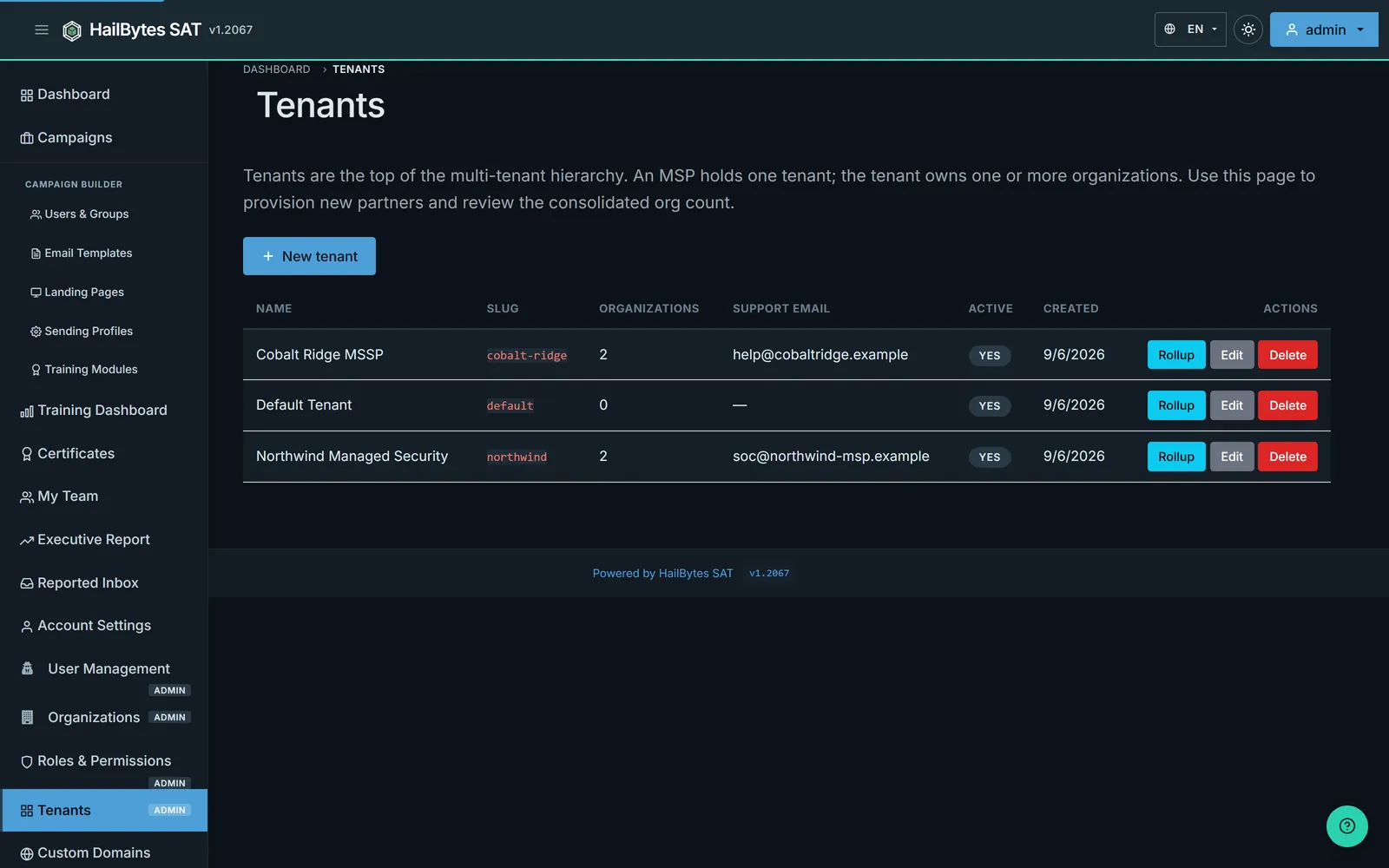
Organizations on one SAT instance share that instance’s console, and /api/tenants
rolls them up. Across instances there is no shared console, so an MSSP running dedicated
per-client instances alongside a consolidated one has to assemble the portfolio view itself.
Each SAT instance carries its own REST API (/api/docs) and a webhook system with
per-event-type filtering, so the cross-instance pattern is aggregation, not a built-in
roll-up. Two ways to do it:
Then render the combined view in your own dashboard. This is one more reason consolidation is the cheaper operating model as well as the cheaper commercial one.
The two products provision differently, so script to each one’s real surface.
/api/docs): create
organizations and members, bulk-import targets (/api/import/group, email,
site, azure-ad), set per-client sending profiles, and roll up partner
tenants via /api/tenants. A new client organization can be stood up entirely from code.
Branding is not part of that loop: it is one instance-wide configuration carrying your brand, set once.POST /api/action/create/project, provision and scope
analyst accounts via SCIM 2.0 (/api/v1/scim/v2/), and stream scan and vulnerability
events out through the per-Project webhook and SIEM dispatch. Per-Project quotas are set in the
console, not over the API.The /billing/projects/ dashboard attributes an instance’s monthly spend
across its Projects in proportion to scan-time-seconds consumed. Margin only survives if a
runaway scan does not quietly consume compute you already priced into a fixed fee, so
ProjectQuota pairs that attribution with hard ceilings:
| Scan scope (Project) | Scans | Scan-time | Vulns (C/H) | Cost share | Attributed | Budget status |
|---|---|---|---|---|---|---|
| Primary domains | 128 | 41h 12m | 2 / 9 | 34% | $571 | ✓ OK |
| Acquired subsidiary | 95 | 33h 05m | 1 / 4 | 27% | $454 | ⚠ Over threshold (86%) |
| Dev & staging | 142 | 28h 47m | 0 / 2 | 24% | $403 | No budget set |
| Brand / typosquat monitoring | 61 | 18h 20m | 3 / 7 | 15% | $252 | ✓ OK |
| 4 active projects | 426 | 121h 24m | 6 / 22 | 100% | $1,680/mo | 1 over threshold |
ASM bills on the same $0.24/vCPU/hour marketplace meter as SAT, with no per-asset and no per-scan fees. Because each client runs its own instance, the per-client cost is a whole instance:
That is a real floor: a small ASM client has to clear roughly $1,680/month of value before you make anything on the platform line.
ASM’s scan worker sizes its CPU and memory limits from the host, so a 16 vCPU instance gives the scan engine twice the cores an 8 vCPU one does, and 32 vCPU four times. Instances deployed before August 2026 keep the old fixed limits until the operator re-runs the installer, so they pick this up on their next update.
ASM has its own resale-authorization path, separate from SAT. On AWS, HailBytes adds your account to the resale-authorized list for the ASM listing (prodview-66d5bswmbtfhs); on Azure, the equivalent for the ASM offer (hardened_ubuntu_with_rengine). You issue the customer a private offer at your resale price, Marketplace splits proceeds (wholesale to HailBytes, margin to you), and the purchase decrements the customer’s AWS EDP or Azure MACC commit: exactly as with SAT. Full mechanics and the annual commitment discount tiers are on the partner resell page.
ASM produces scheduled recurring reports deliverable by email: vulnerability findings by severity, newly discovered assets, resolved findings, and per-framework compliance evidence (SOC 2 CC7.x, NIST CSF 2.0, HIPAA, PCI-DSS 11.3, and 7 more). Everything is also exportable via SARIF and the REST API, so it drops straight into whatever client report template you already run, under your white-label branding.
ASM has three operator roles: Sys Admin, Penetration Tester, and Auditor: and they are instance-wide, not Project-scoped. Project membership does scope what an account sees, so an Auditor who belongs to one Project sees one Project’s findings; what you cannot do is give someone Auditor on one client and Penetration Tester on another. The reason not to hand a client a login today is narrower and more concrete: the billing screens are hidden from the sidebar but not access-gated. So the intended client touchpoint remains the scheduled white-label PDF report delivered by email, plus per-Project SARIF and REST API exports that drop into your own client portal. Give clients deliverables, not a login. It keeps the tenant boundary clean and means a client never lands in the shared console.
ASM (and SAT) findings do not stop at CSV. Per-Project dispatchers forward events to the tools your SOC already runs:
A per-integration severity floor lets you gate which findings reach each client’s SIEM, and event categories (vulnerability, scan, audit, change, brand-risk) toggle independently.
No native PSA connector. There is no ConnectWise, Autotask, or Halo PSA integration. Route findings into your PSA through the HMAC-signed generic webhook, posting to its inbound API directly or via a middleware layer (Zapier, Make, n8n). See all integrations →
Redesigned for MSSP operators: triage banner with diff-from-last-scan summary, status-filtered findings at a glance, real-time scan progress bars, and attack-path visualization with MITRE ATT&CK badges, giving analysts a client-ready narrative beyond a CVE list.
ProjectQuota enforces target and scan ceilings per Project, so one scan scope cannot exhaust a client’s instance. Automatic 90-day scan history retention with durable ScanSnapshot aggregates keeps client SLA reporting intact even after data purges.
For enterprise and government procurement: SOC 2 CC7.x, NIST CSF 2.0, HIPAA, PCI DSS v4.0, FedRAMP, NYDFS 500, and CIS Controls v8 IG1+IG2 (North American), LGPD (Latin American), ISO 27001:2022, GDPR Art. 32, and IEC 62443 (global), and Australian Government ISM / Essential Eight (Asia-Pacific), all generating exportable evidence reports your clients can hand to auditors.
A marketplace deployment is the trial, not the evaluation. If you’re still answering “does this do what our service needs?”, the two walkthroughs on this page and the console screenshots below answer it without a cloud account, an IAM ticket, or an SSH key.
Both walkthroughs are embedded higher up this page and are click-to-play, so nothing loads until you start them: the 4-minute SAT walkthrough and the 11-minute ASM walkthrough. The ASM one was recorded with several clients as Projects on one instance, which is the shape we run where clients receive reports rather than logins; read it alongside the tenancy note above.
Unmodified screenshots of the shipping UI, at the places an MSSP evaluator usually wants proof rather than prose. Open any of them full-size in a new tab.
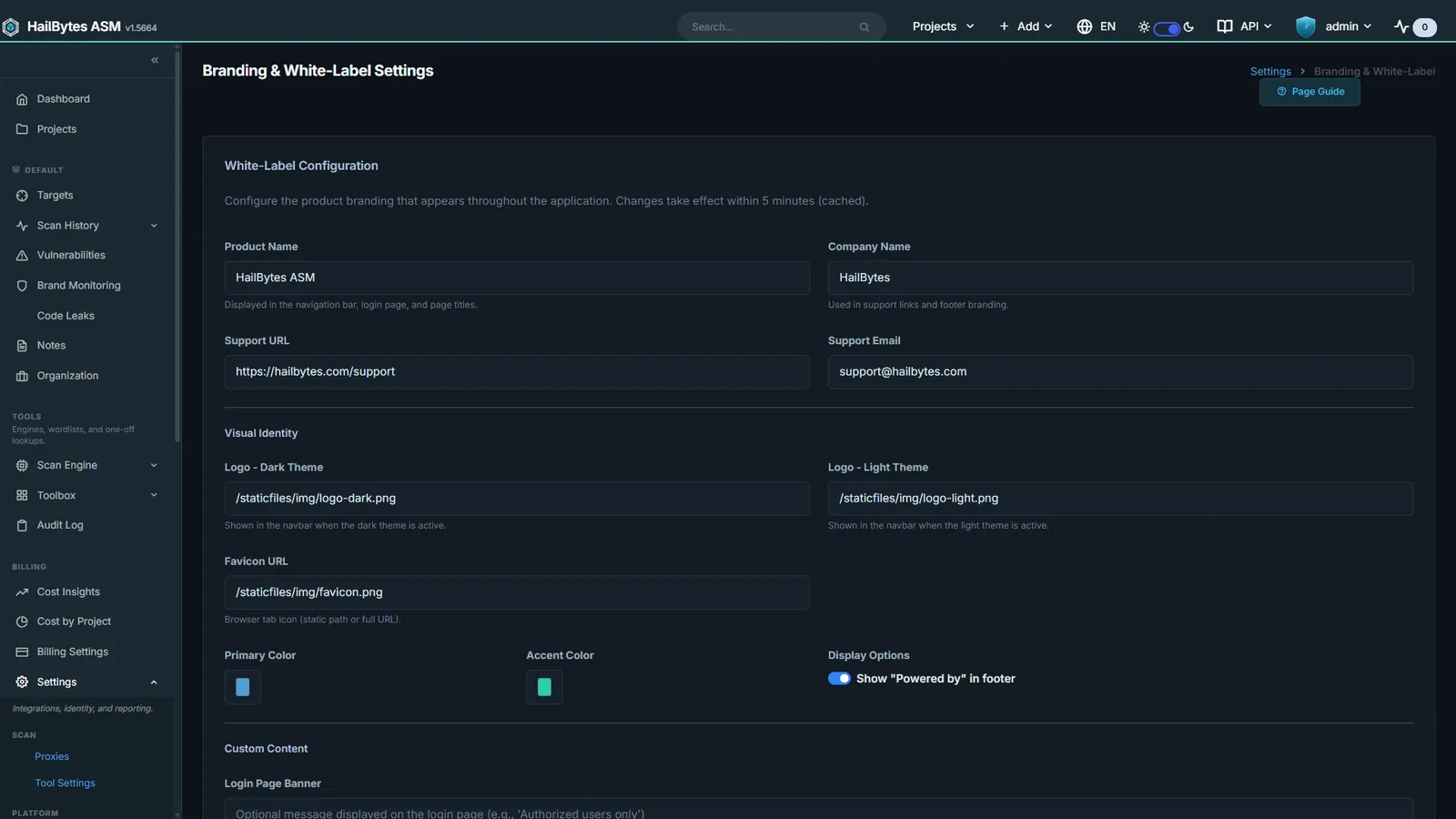
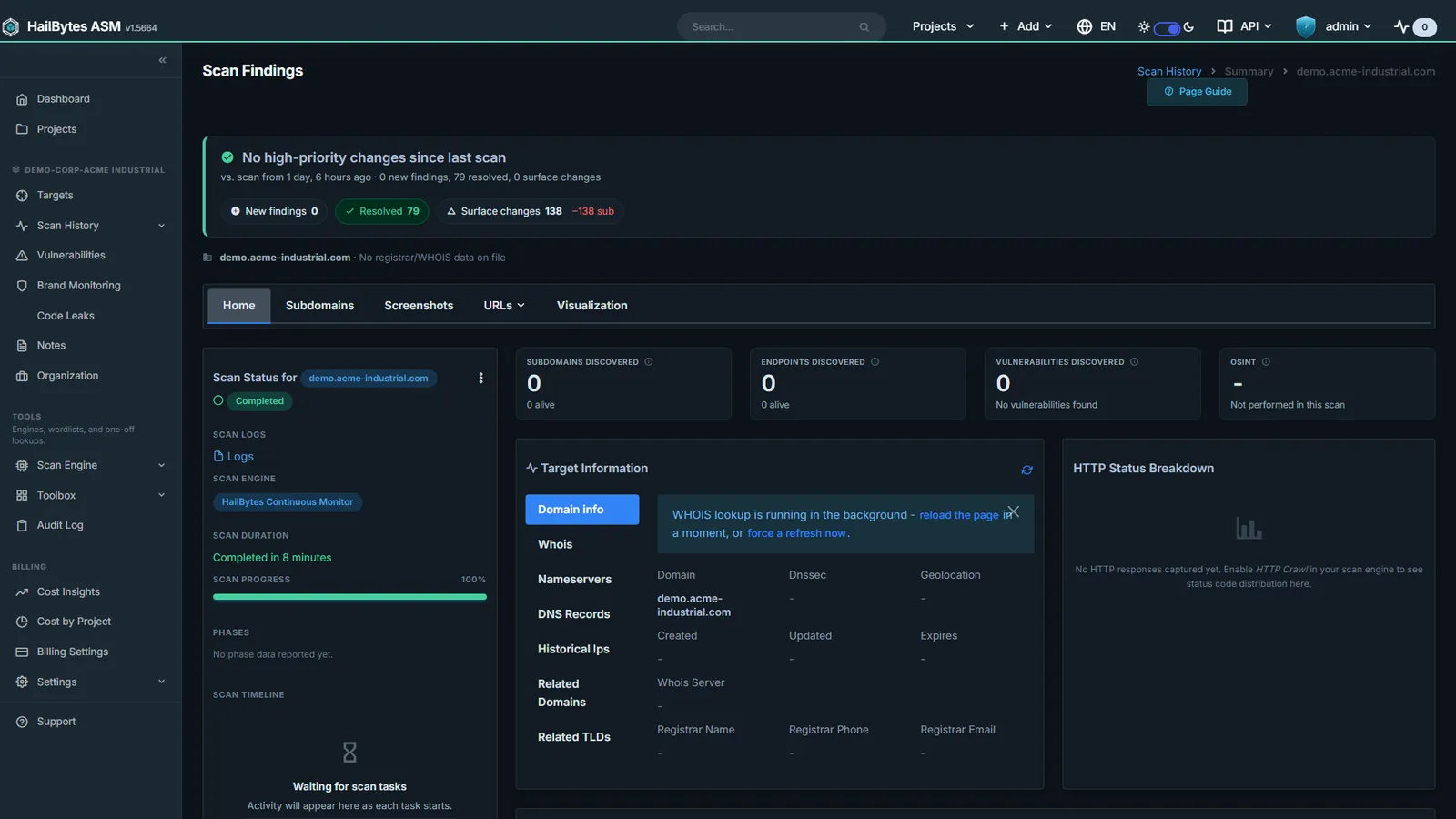

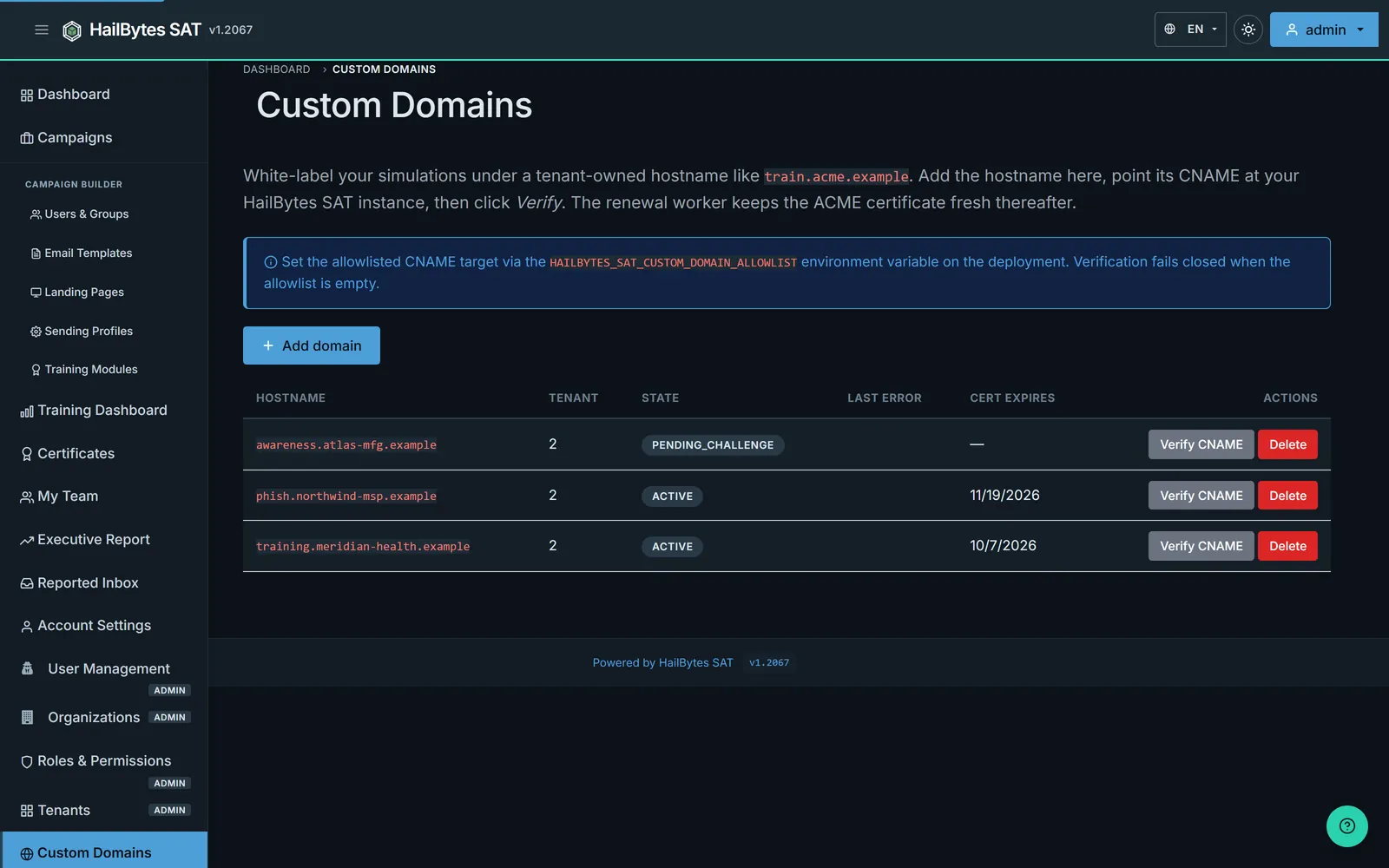
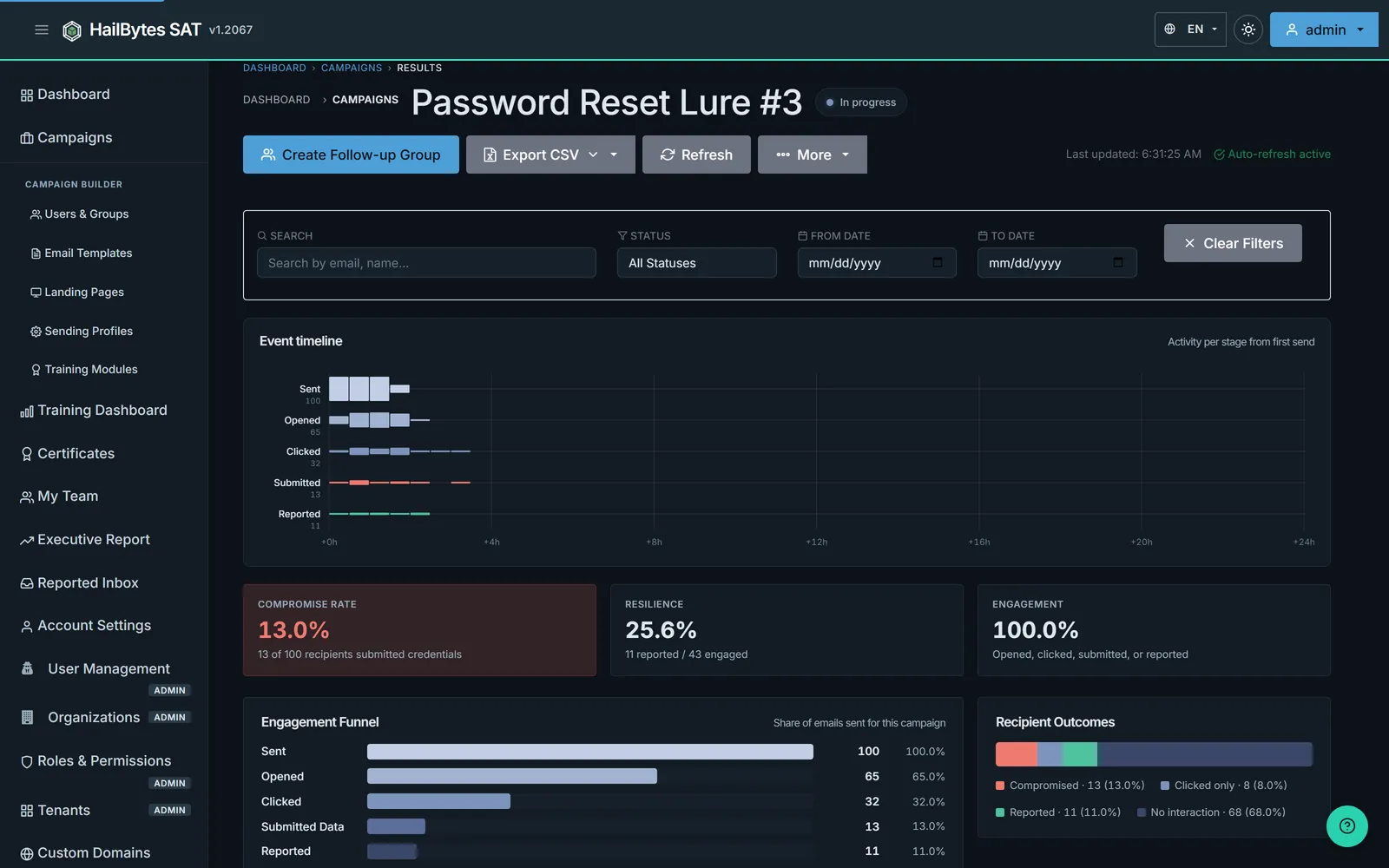
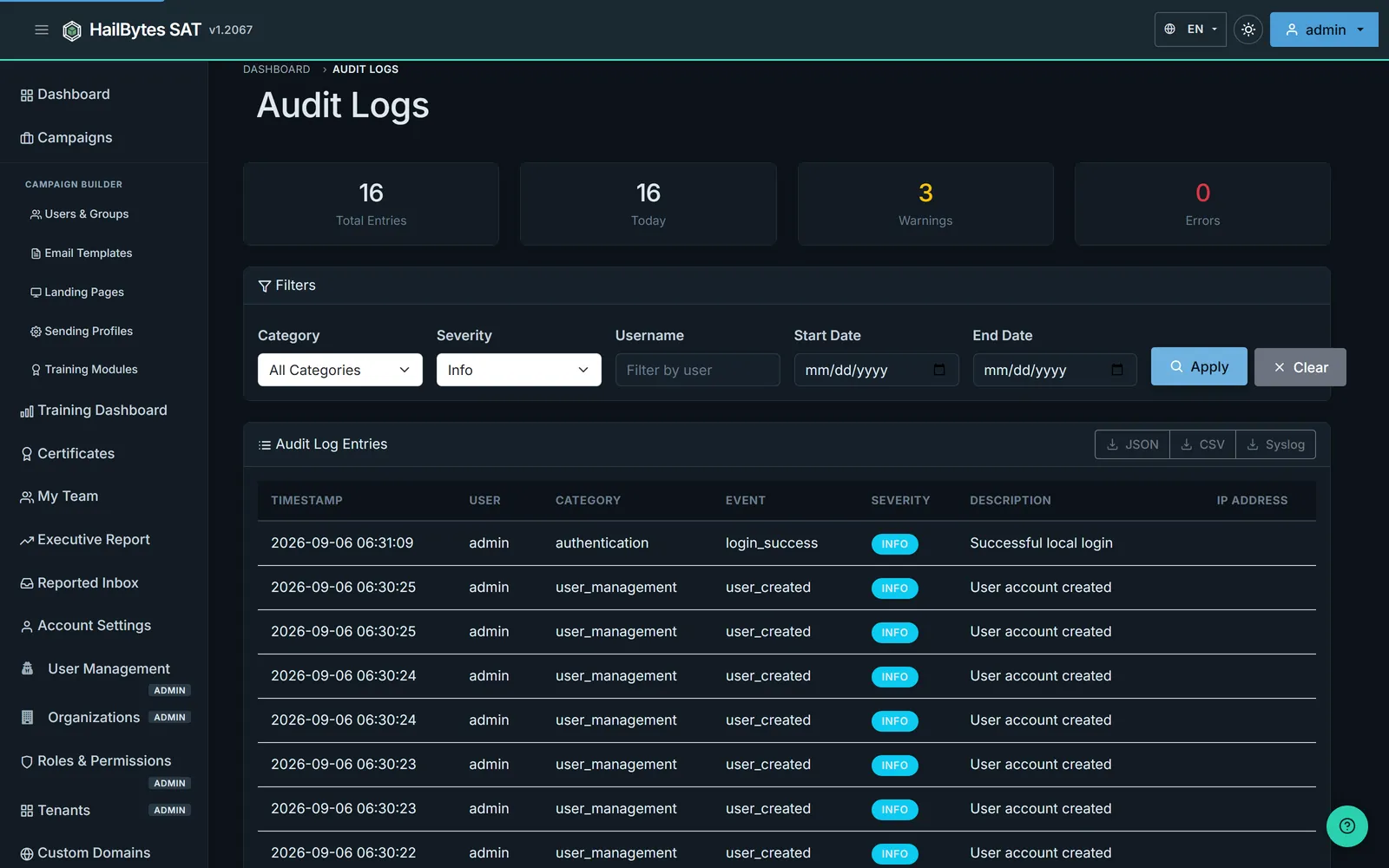
The claims further up this page (branded PDF reports, audit-trail CSVs, SARIF and REST exports) are configuration screens and export buttons in the product, so here they are:
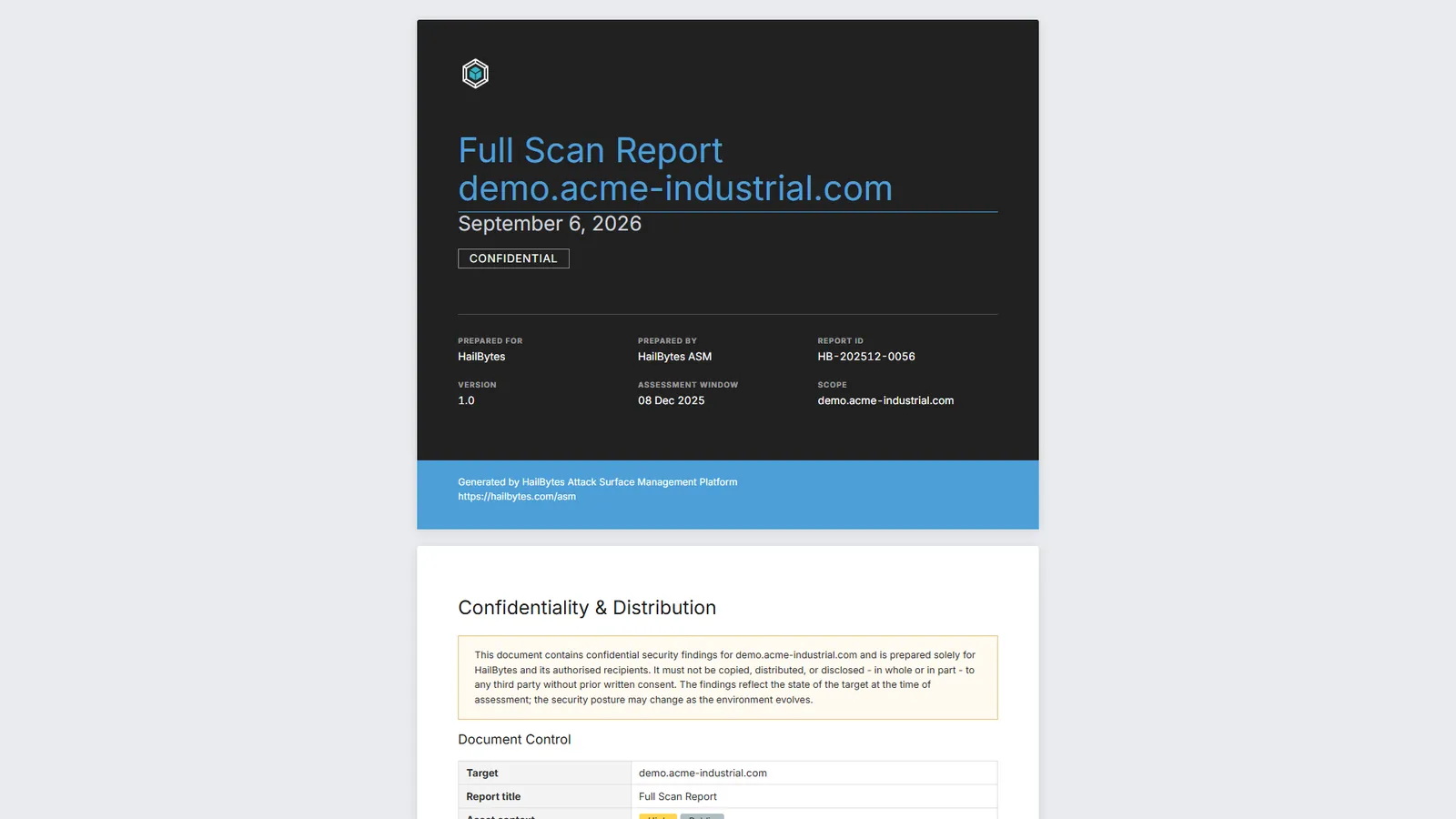
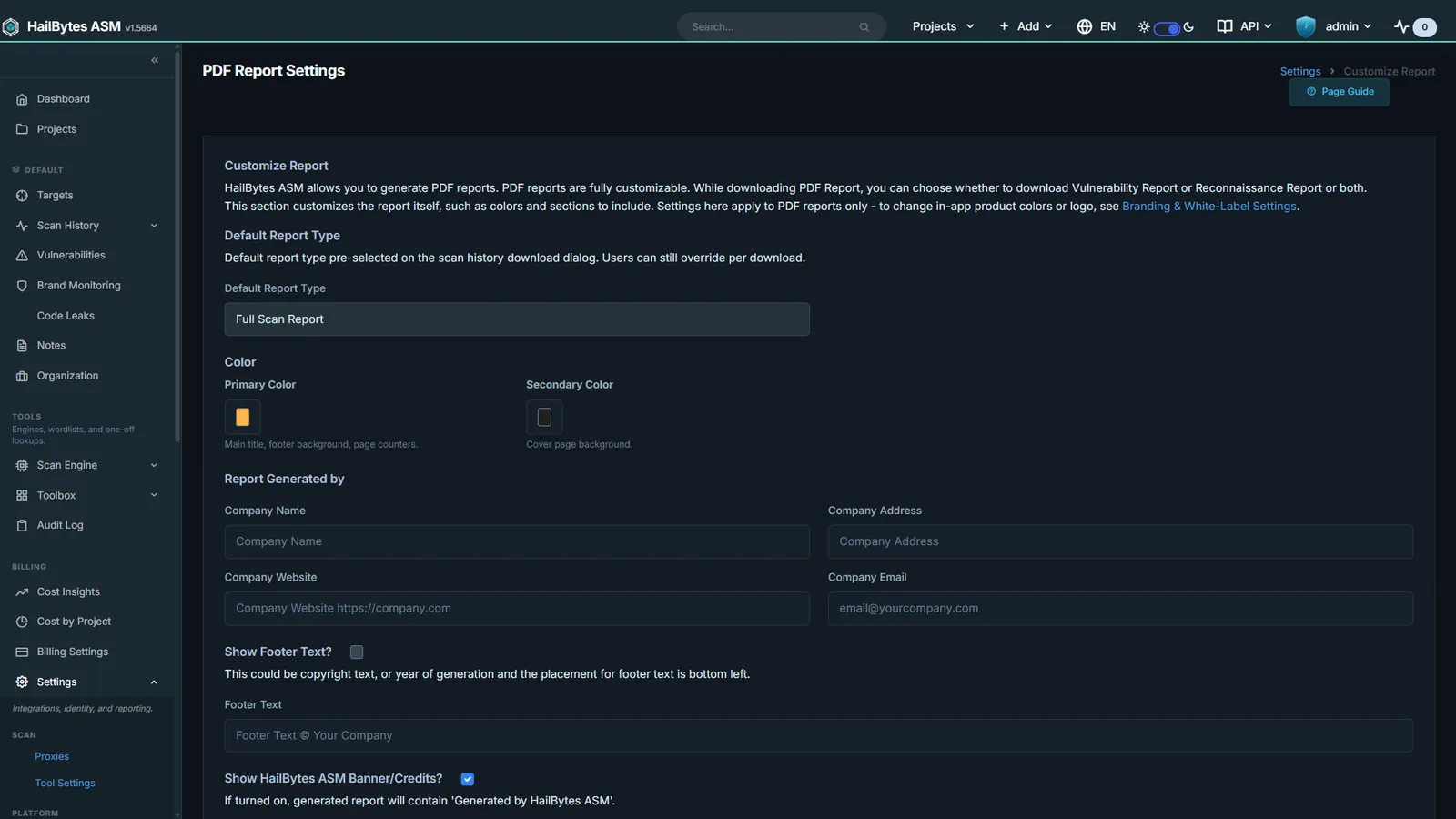


The report above is real output against a public test target, not a mock-up, but it carries
our branding and a test domain, not a client’s. There is also no
/billing/projects/ screenshot with client names on it.
To produce either we would have to invent the customer, the logo, and the numbers. A fabricated artifact presented as a real client deliverable is worse than no artifact at all in an RFP, and you would find out on the first PoC.
What you get instead: the real exports above, a clearly labeled representative cost-attribution rollup with anonymized project names earlier on this page, and a 14-day PoC that generates branded reports against your own tenant and your own clients. Need a branded sample sooner for a client conversation? Raise it on the scoping call.
A structured path from first call to a go/no-go decision, no open-ended trial.
Walk through your client portfolio, get a tier-mix recommendation, and confirm topology fit.
One live client tenant with Terraform modules, deployment support, and a structured test plan. Deliverable: a working campaign or scan report you can show your client.
Proceed to your first production instance, or cancel with no commitment.
Full mechanics are documented on the PoC process page. When a client campaign or scan needs help at 11 PM, MSSP support tiers and response-time SLAs spell out the escalation path and dedicated-contact options. Review them before you commit so the answer is in hand for your stakeholders.
Onboarding is measured in hours, not a quarter. There’s no vendor-side provisioning queue because you deploy into your own cloud account.
sat-aws-single / sat-azure-single Terraform module into your (or the client’s) account: live in minutes either way.ProjectQuota (target, scan-rate, and monthly budget ceilings).Deployment specifics (module variables, region selection, and HA / autoscale shapes) live in the Terraform modules and the ASM Solution Brief.
“What happens to our data if we leave?” is a first-call procurement question. Because HailBytes is Bring-Your-Own-Cloud, the answer is clean and verifiable.
terraform destroy (or by deleting the marketplace instance), leaving nothing on a shared plane. Where a client MSA requires the second guarantee in writing, deploy them dedicated.terraform destroy (or by deleting the marketplace instance). Deleting an individual Project purges that scan scope inside a live instance; the 90-day scan-history retention and durable ScanSnapshot aggregates age out on their own.What you need for managed-service delivery at scale, each links to the authoritative reference.
Packaging, margin math, and CPPO/MPO resale mechanics for turning SAT/ASM into a recurring-revenue service line. Instant access.
Spin up a 30-day free trial through the AWS or Azure marketplace, or book 15 minutes to walk through tier mix and white-label arrangements for your client portfolio.
Running client SLAs? See MSSP support tiers and response-time SLAs for production-incident escalation paths.
15 minutes to walk through your client portfolio, tier mix, white-label setup, and CPPO/MPO resale mechanics, with a solutions engineer, not a generic intro call.