Deploy HailBytes SAT on Azure
Launch a fully-configured HailBytes SAT instance on Azure in under 5 minutes using ARM templates.
Overview
This tutorial guides you through deploying HailBytes SAT on Microsoft Azure using our pre-built ARM (Azure Resource Manager) template. The deployment creates all necessary resources including VMs, networking, and managed databases.
Watch: Azure deployment walkthrough

Deploy on Azure end-to-end in about five minutes.
Prerequisites
- Azure Subscription with Contributor access
- Basic understanding of Azure Resource Groups
- Azure CLI installed (optional)
What You'll Get
- Azure VM running HailBytes SAT (
Standard_D8s_v5recommended: 8 vCPU, 32GiB) - Network Security Group configured for HTTPS and admin access
- Public IP address for external connectivity
- Azure Database for PostgreSQL
- Managed SSL certificates via Application Gateway

HailBytes SAT on Azure Marketplace
Step 1: Access Azure Portal
Log into the Azure Portal and create a new Resource Group for your HailBytes SAT deployment.
- Navigate to portal.azure.com
- Click "Resource groups" → "Create"
- Name it "rg-hailbytes-sat-prod" in your preferred region
- Click "Review + Create" → "Create"
Step 2: Deploy ARM Template
Use our ARM template to deploy HailBytes SAT infrastructure:
# Using Azure CLI
az deployment group create \
  --resource-group rg-hailbytes-sat-prod \
  --template-uri https://hailbytes.com/templates/hailbytes-sat-arm-template.json \
  --parameters vmSize=Standard_D8s_v5 adminUsername=azureuser

# Or click this button in the portal:
# Deploy to Azure button links to template
Alternatively, in the Azure Portal: go to "Create a resource" → "Template deployment" → "Build your own template" → paste the ARM template JSON.
Step 3: Configure Deployment Parameters
Fill in the required parameters for your deployment:
| Parameter | Value | Description |
|---|---|---|
vmName | vm-hailbytes-sat-prod | Virtual machine name |
vmSize | Standard_D8s_v5 | 8 vCPUs, 32GiB RAM (provisioning default) |
adminUsername | azureuser | SSH admin username |
authenticationType | sshPublicKey | SSH key or password |
databaseSKU | B_Gen5_1 | PostgreSQL tier |
Step 4: Review and Create
Validate your configuration and deploy the resources.
- Review all parameters in the validation screen
- Check estimated costs in the summary
- Click "Create" to begin deployment
- Monitor deployment progress in "Deployments" tab
- Wait for "Deployment succeeded" status (3-5 minutes)
Step 5: Access Your HailBytes SAT Dashboard
Once deployment completes, retrieve your connection information:
# Get public IP address
az vm show -d -g rg-hailbytes-sat-prod -n vm-hailbytes-sat-prod \
  --query publicIps -o tsv

# Get deployment outputs
az deployment group show \
  -g rg-hailbytes-sat-prod \
  -n hailbytes-sat-deployment \
  --query properties.outputs

# Outputs will include:
# - adminURL: https://:3333
# - publicURL: https://
# - sshCommand: ssh azureuser@
Navigate to the Admin URL and log in with default credentials (sent to your admin email).

HailBytes SAT login page - the first stop after your Azure deployment completes.
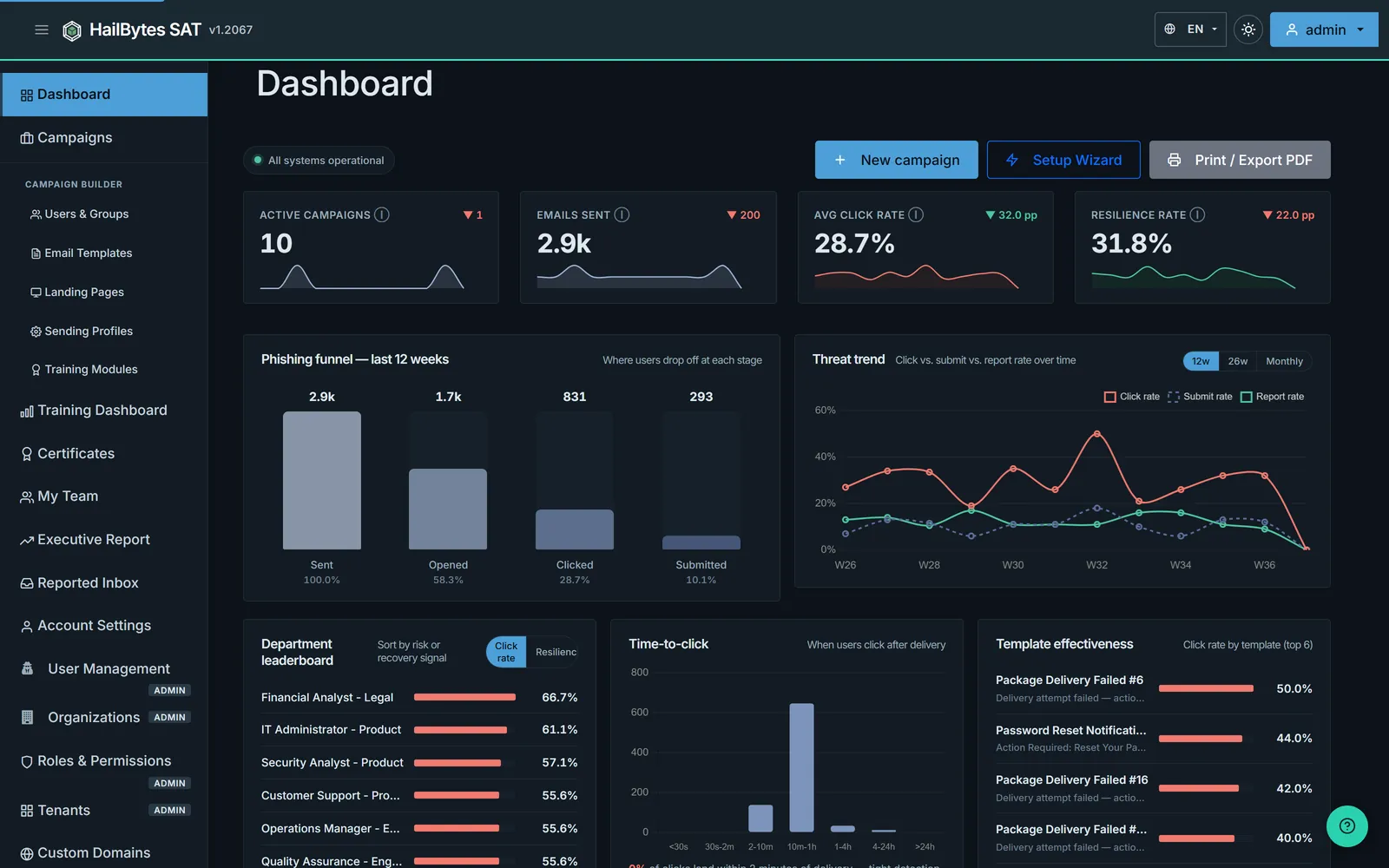
Dashboard on first sign-in - the Setup Progress checklist walks you through MFA, templates, profiles, and your first campaign.
Post-Deployment Configuration
Security Best Practices
- ✓ Change default admin password immediately
- ✓ Configure Azure Application Gateway for SSL/TLS
- ✓ Update NSG rules to restrict IP access
- ✓ Enable Azure Monitor for VM and database metrics
- ✓ Set up Azure Backup for VM and database
- ✓ Configure custom domain with Azure DNS
Cost Estimation
Monthly costs for a typical HailBytes SAT deployment. Keep the two halves separate: the infrastructure line is what Azure charges for the VM, database, disk, IP and egress, and the marketplace meter is the HailBytes software fee. Deployments are bring-your-own-cloud, so both land on the same Azure invoice but the meter never included the underlying VM. The infrastructure figure is the whole-stack estimate we publish everywhere, roughly $35/vCPU/month, so $280 at 8 vCPU, rather than a per-resource build-up, so that every page quotes the same number. Pay-as-you-go rates for East US; revalidate before you budget.
| Resource | Configuration | Est. Monthly Cost |
|---|---|---|
| Azure infrastructure (whole stack) | Standard_D8s_v5 (8 vCPU, 32GiB) plus Azure Database for PostgreSQL, managed disk, public IP and egress: ~$35/vCPU/month | $280 |
| HailBytes SAT marketplace meter | 8 vCPU × 730 h × $0.24, 24/7 | $1,400 |
| Total | ~$1,680/month | |
Annual commitments cut the meter (30% for one year paid upfront, 35% for two, 40% for three) delivered as an Azure private offer. At the three-year rate the meter is $10,080/year. See pricing for the full ladder. The B_Gen5_1 database tier is sized for a small population; step it up alongside the app tier for large campaigns.
Next Steps
Create Your First Campaign
Learn how to set up and launch your first phishing simulation campaign.
View Tutorial →Email Template Best Practices
Design effective phishing templates that test user awareness.
View Tutorial →Need Help?
If you encounter issues during deployment, our support team is here to help.
Contact SupportGet the Free HailBytes SAT Getting Started Guide
A 7-part email series covering everything from your first deployment to advanced configuration and real-world workflows. One email per day, no spam.